코덱
zod@4.1에서 도입되었습니다.
모든 Zod 스키마는 정방향과 역방향으로 입력을 처리할 수 있습니다.
- 정방향:
Input에서Output으로.parse().decode()
- 역방향:
Output에서Input으로.encode()
대부분 이 구분은 중요하지 않습니다. 입력과 출력 타입이 같아 "정방향"과 "역방향"의 결과도 동일합니다.
- Zod
- Zod Mini
const schema = z.string();

type Input = z.input<typeof schema>;    // string
type Output = z.output<typeof schema>;  // string

schema.parse("asdf");   // => "asdf"
schema.decode("asdf");  // => "asdf"
schema.encode("asdf");  // => "asdf"
const schema = z.string();

type Input = z.input<typeof schema>;    // string
type Output = z.output<typeof schema>;  // string

z.parse(schema, "asdf");   // => "asdf"
z.decode(schema, "asdf");  // => "asdf"
z.encode(schema, "asdf");  // => "asdf"
하지만 일부 스키마 타입, 특히 z.codec()은 입력과 출력 타입을 서로 다르게 만듭니다. 코덱은 두 스키마 사이의 양방향 변환을 정의하는 특별한 스키마 타입입니다.
const stringToDate = z.codec(
  z.iso.datetime(),  // input schema: ISO date string
  z.date(),          // output schema: Date object
  {
    decode: (isoString) => new Date(isoString), // ISO string → Date
    encode: (date) => date.toISOString(),       // Date → ISO string
  }
);
이런 경우 z.decode()와 z.encode()는 상당히 다르게 동작합니다.
- Zod
- Zod Mini
stringToDate.decode("2024-01-15T10:30:00.000Z")
// => Date

stringToDate.encode(new Date("2024-01-15T10:30:00.000Z"))
// => string
z.decode(stringToDate, "2024-01-15T10:30:00.000Z")
// => Date

z.encode(stringToDate, new Date("2024-01-15T10:30:00.000Z"))
// => string
참고 — 여기서 방향이나 용어 자체에 특별한 의미는 없습니다.
A -> B코덱으로 인코딩하는 대신B -> A코덱으로 디코딩할 수도 있습니다. "디코딩"과 "인코딩"이라는 용어는 관례일 뿐입니다.
이는 네트워크 경계에서 데이터를 파싱할 때 특히 유용합니다. 클라이언트와 서버에서 하나의 Zod 스키마를 공유한 다음, 이 스키마를 사용해 네트워크로 전송하기 좋은 형식(예: JSON)과 더 풍부한 JavaScript 표현 사이를 변환할 수 있습니다.


코덱 반전하기
z.invertCodec()을 사용해 기존 코덱에서 역방향 코덱을 파생할 수 있습니다. 반환된 코덱은 입력과 출력 스키마를 서로 바꾸고, decode와 encode 변환도 서로 바꿉니다.
- Zod
- Zod Mini
const dateToString = z.invertCodec(stringToDate);

dateToString.decode(new Date("2024-01-15T10:30:00.000Z"));
// => string

dateToString.encode("2024-01-15T10:30:00.000Z");
// => Date
const dateToString = z.invertCodec(stringToDate);

z.decode(dateToString, new Date("2024-01-15T10:30:00.000Z"));
// => string

z.encode(dateToString, "2024-01-15T10:30:00.000Z");
// => Date
z.invertCodec()은 전달된 코덱만 반전합니다. 다른 스키마 안에 중첩된 코덱을 재귀적으로 반전하지 않으므로, 역방향 스키마를 정의하는 곳에서 해당 코덱을 반전하세요.
조합 가능성
참고 —
z.encode()와z.decode()는 어떤 스키마와도 함께 사용할 수 있습니다. 반드시 ZodCodec일 필요는 없습니다.
코덱도 일반적인 Zod 스키마처럼 사용할 수 있습니다. 객체, 배열, 파이프 등에 중첩할 수 있으며, 사용할 수 있는 위치에 제약은 없습니다!
const payloadSchema = z.object({
  startDate: stringToDate
});

payloadSchema.decode({
  startDate: "2024-01-15T10:30:00.000Z"
}); // => { startDate: Date }
타입 안전한 입력
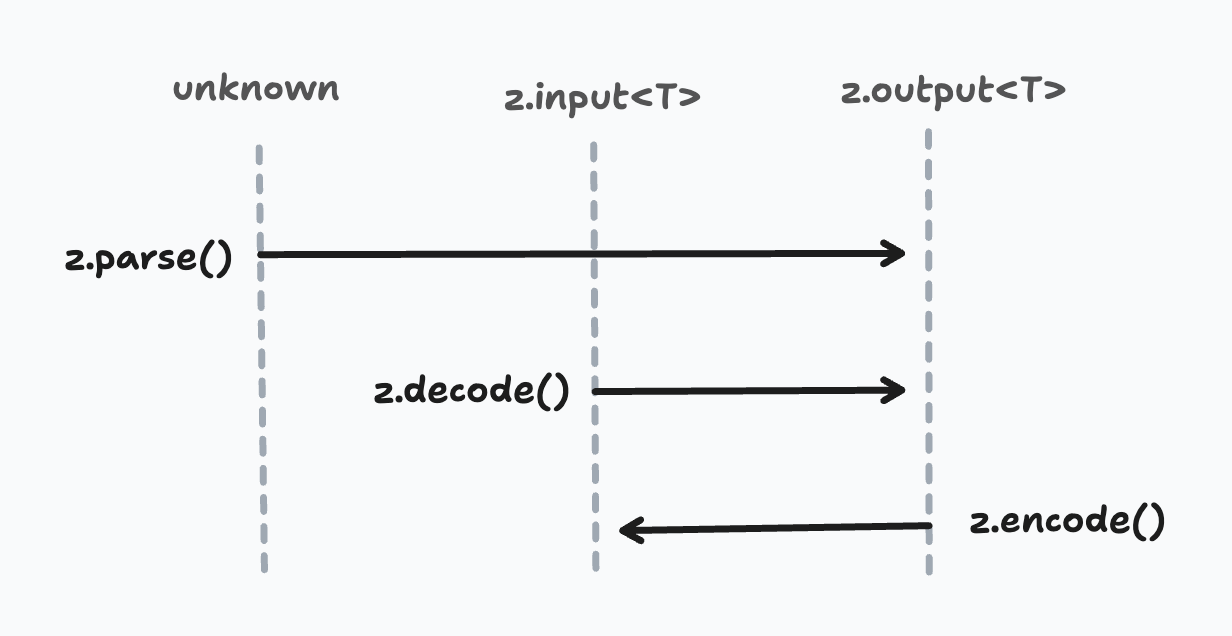
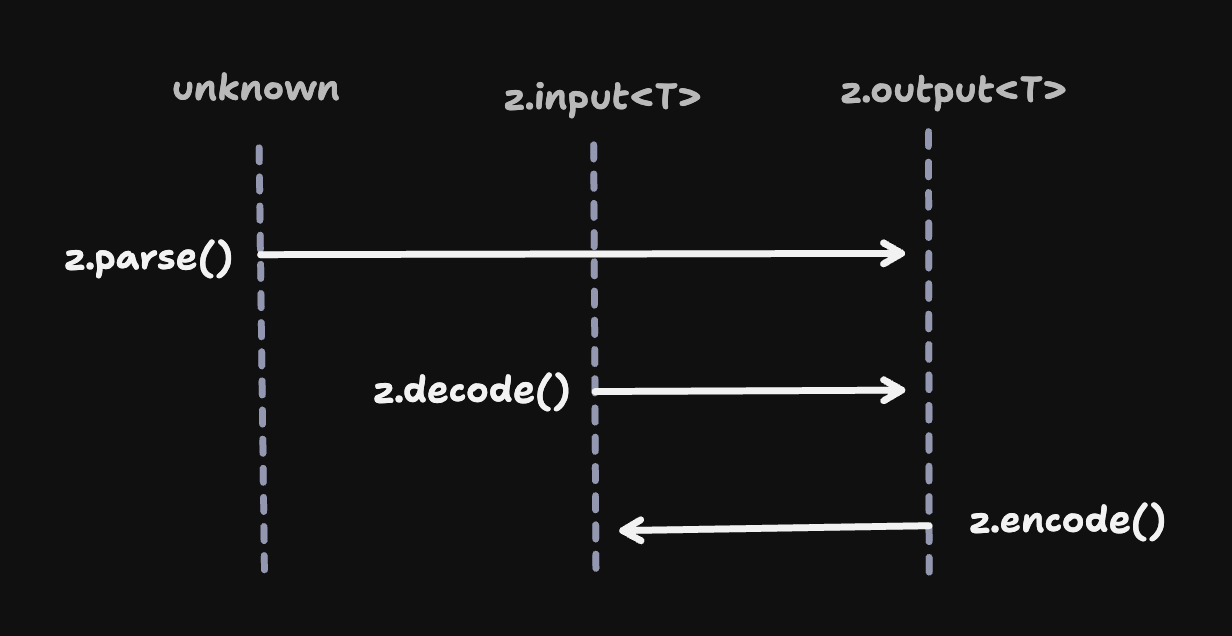
.parse()와 .decode()는 런타임에 동일하게 동작하지만 타입 시그니처는 다릅니다. .parse() 메서드는 unknown을 입력으로 받고 스키마에서 추론한 출력 타입과 일치하는 값을 반환합니다. 반면 z.decode()와 z.encode() 함수는 입력 타입이 구체적으로 정해져 있습니다.
stringToDate.parse(12345);
// no complaints from TypeScript (fails at runtime)

stringToDate.decode(12345);
// ❌ TypeScript error: Argument of type 'number' is not assignable to parameter of type 'string'.

stringToDate.encode(12345);
// ❌ TypeScript error: Argument of type 'number' is not assignable to parameter of type 'Date'.
왜 이런 차이가 있을까요? 인코딩과 디코딩에는 변환이 수반됩니다. 많은 경우 이 메서드에 전달할 값의 타입은 애플리케이션 코드에서 이미 정해져 있습니다. 따라서 z.decode/z.encode는 타입이 지정된 입력을 받아 컴파일 시점에 실수를 드러냅니다.
다음 다이어그램은 parse(), decode(), encode() 타입 시그니처의 차이를 보여줍니다.
비동기 및 안전 변형
.transform() 및 .refine()과 마찬가지로 코덱도 비동기 변환을 지원합니다.
const asyncCodec = z.codec(z.string(), z.number(), {
  decode: async (str) => Number(str),
  encode: async (num) => num.toString(),
});
일반 parse()와 마찬가지로 decode()와 encode()에도 "안전" 및 "비동기" 변형이 있습니다.
stringToDate.decode("2024-01-15T10:30:00.000Z");
// => Date

stringToDate.decodeAsync("2024-01-15T10:30:00.000Z");
// => Promise<Date>

stringToDate.safeDecode("2024-01-15T10:30:00.000Z");
// => { success: true, data: Date } | { success: false, error: ZodError }

stringToDate.safeDecodeAsync("2024-01-15T10:30:00.000Z");
// => Promise<{ success: true, data: Date } | { success: false, error: ZodError }>
인코딩 작동 원리
일부 Zod 스키마가 파싱 동작을 "반대로" 수행하는 방식에는 몇 가지 미묘한 점이 있습니다.
코덱
코덱은 비교적 이해하기 쉽습니다. 두 타입 사이의 양방향 변환을 캡슐화합니다. z.decode()는 decode 변환을 실행해 입력을 파싱된 값으로 바꾸고, z.encode()는 encode 변환을 실행해 다시 직렬화합니다.
const stringToDate = z.codec(
  z.iso.datetime(),  // input schema: ISO date string
  z.date(),          // output schema: Date object
  {
    decode: (isoString) => new Date(isoString), // ISO string → Date
    encode: (date) => date.toISOString(),       // Date → ISO string
  }
);

stringToDate.decode("2024-01-15T10:30:00.000Z");
// => Date

stringToDate.encode(new Date("2024-01-15"));
// => string
파이프
알아두기 — 코덱은 내부적으로 "중간" 변환 로직을 갖춘 파이프의 하위 클래스로 구현됩니다.
일반적인 디코딩에서 ZodPipe<A, B> 스키마는 먼저 A로 데이터를 파싱한 다음 B로 전달합니다. 예상할 수 있듯 인코딩할 때는 먼저 B로 데이터를 인코딩한 다음 A로 전달합니다.
세부 검증
모든 검사(.refine(), .min(), .max() 등)는 양방향에서 모두 실행됩니다.
const schema = stringToDate.refine((date) => date.getFullYear() >= 2000, "Must be this millennium");

schema.encode(new Date("2000-01-01"));
// => Date

schema.encode(new Date("1999-01-01"));
// => ❌ ZodError: [
//   {
//     "code": "custom",
//     "path": [],
//     "message": "Must be this millennium"
//   }
// ]
사용자 지정 .refine() 로직에서 예상치 못한 오류를 방지하기 위해 Zod는 z.encode() 중 두 차례 검사합니다. 첫 번째 검사에서는 입력 타입이 예상 타입과 일치하는지 확인합니다(invalid_type 오류가 없는지 검사). 이를 통과하면 두 번째 검사에서 세부 검증 로직을 실행합니다.
이 방식은 z.string().trim() 또는 z.string().toLowerCase() 같은 "값을 변경하는 변환"도 지원합니다.
const schema = z.string().trim();

schema.decode("  hello  ");
// => "hello"

schema.encode("  hello  ");
// => "hello"
기본값과 프리폴트
기본값과 프리폴트는 "정방향"으로만 적용됩니다.
const stringWithDefault = z.string().default("hello");

stringWithDefault.decode(undefined);
// => "hello"

stringWithDefault.encode(undefined);
// => ZodError: Expected string, received undefined
스키마에 기본값을 설정하면 입력은 선택 사항(| undefined)이 되지만 출력은 그렇지 않습니다. 따라서 undefined는 z.encode()의 유효한 입력이 아니며 기본값이나 프리폴트가 적용되지 않습니다.
오류 대체
마찬가지로 .catch()는 "정방향"으로만 적용됩니다.
const stringWithCatch = z.string().catch("hello");

stringWithCatch.decode(1234);
// => "hello"

stringWithCatch.encode(1234);
// => ZodError: Expected string, received number
문자열 불리언
참고 — Stringbool은 Zod에 코덱이 도입되기 전부터 있었습니다. 이후 내부적으로 코덱으로 다시 구현되었습니다.
z.stringbool() API는 문자열 값("true", "false", "yes", "no" 등)을 boolean으로 변환합니다. 기본적으로 true는 "true"로, false는 "false"로 변환하며 이 동작은 z.encode() 중에 일어납니다.
const stringbool = z.stringbool();

stringbool.decode("true");  // => true
stringbool.decode("false"); // => false

stringbool.encode(true);    // => "true"
stringbool.encode(false);   // => "false"
사용자 지정 truthy 및 falsy 값 집합을 지정하면 대신 배열의 첫 번째 요소를 사용합니다.
const stringbool = z.stringbool({ truthy: ["yes", "y"], falsy: ["no", "n"] });

stringbool.encode(true);    // => "yes"
stringbool.encode(false);   // => "no"
변환
⚠️ — .transform() API는 단방향 변환을 구현합니다. 스키마 어디에든 .transform()이 있으면 z.encode() 작업을 시도할 때 ZodError가 아닌 런타임 오류가 발생합니다.
const schema = z.string().transform(val => val.length);

schema.encode(1234);
// ❌ Error: Encountered unidirectional transform during encode: ZodTransform
유용한 코덱
다음은 자주 필요한 여러 코덱의 구현입니다. 자유롭게 사용자 지정할 수 있도록 Zod 자체의 내장 API에는 포함하지 않았습니다. 대신 프로젝트에 복사하여 붙여 넣고 필요에 맞게 수정하세요.
참고 — 아래 코덱 구현은 정확성을 테스트했습니다.
stringToNumber
숫자를 나타내는 문자열을 JavaScript number 타입으로 변환하며 parseFloat()을 사용합니다.
const stringToNumber = z.codec(z.string().regex(z.regexes.number), z.number(), {
  decode: (str) => Number.parseFloat(str),
  encode: (num) => num.toString(),
});

stringToNumber.decode("42.5");  // => 42.5
stringToNumber.encode(42.5);    // => "42.5"
stringToInt
정수를 나타내는 문자열을 JavaScript number 타입으로 변환하며 parseInt()를 사용합니다.
const stringToInt = z.codec(z.string().regex(z.regexes.integer), z.int(), {
  decode: (str) => Number.parseInt(str, 10),
  encode: (num) => num.toString(),
});

stringToInt.decode("42");  // => 42
stringToInt.encode(42);    // => "42"
stringToBigInt
문자열 표현을 JavaScript bigint 타입으로 변환합니다.
const stringToBigInt = z.codec(z.string(), z.bigint(), {
  decode: (str) => BigInt(str),
  encode: (bigint) => bigint.toString(),
});

stringToBigInt.decode("12345");  // => 12345n
stringToBigInt.encode(12345n);   // => "12345"
numberToBigInt
JavaScript number를 bigint 타입으로 변환합니다.
const numberToBigInt = z.codec(z.int(), z.bigint(), {
  decode: (num) => BigInt(num),
  encode: (bigint) => Number(bigint),
});

numberToBigInt.decode(42);   // => 42n
numberToBigInt.encode(42n);  // => 42
isoDatetimeToDate
ISO 날짜-시간 문자열을 JavaScript Date 객체로 변환합니다.
const isoDatetimeToDate = z.codec(z.iso.datetime(), z.date(), {
  decode: (isoString) => new Date(isoString),
  encode: (date) => date.toISOString(),
});

isoDatetimeToDate.decode("2024-01-15T10:30:00.000Z");  // => Date object
isoDatetimeToDate.encode(new Date("2024-01-15"));       // => "2024-01-15T00:00:00.000Z"
epochSecondsToDate
Unix 타임스탬프(에포크 이후 초)를 JavaScript Date 객체로 변환합니다.
const epochSecondsToDate = z.codec(z.int().min(0), z.date(), {
  decode: (seconds) => new Date(seconds * 1000),
  encode: (date) => Math.floor(date.getTime() / 1000),
});

epochSecondsToDate.decode(1705314600);  // => Date object
epochSecondsToDate.encode(new Date());  // => Unix timestamp in seconds
epochMillisToDate
Unix 타임스탬프(에포크 이후 밀리초)를 JavaScript Date 객체로 변환합니다.
const epochMillisToDate = z.codec(z.int().min(0), z.date(), {
  decode: (millis) => new Date(millis),
  encode: (date) => date.getTime(),
});

epochMillisToDate.decode(1705314600000);  // => Date object
epochMillisToDate.encode(new Date());     // => Unix timestamp in milliseconds
json(schema)
JSON 문자열을 구조화된 데이터로 파싱하고 다시 JSON으로 직렬화합니다. 이 제네릭 함수는 파싱된 JSON 데이터를 검증할 출력 스키마를 받습니다.
const jsonCodec = <T extends z.core.$ZodType>(schema: T) =>
  z.codec(z.string(), schema, {
    decode: (jsonString, ctx) => {
      try {
        return JSON.parse(jsonString);
      } catch (err: any) {
        ctx.issues.push({
          code: "invalid_format",
          format: "json",
          input: jsonString,
          message: err.message,
        });
        return z.NEVER;
      }
    },
    encode: (value) => JSON.stringify(value),
  });
특정 스키마를 사용한 예시는 다음과 같습니다.
const jsonToObject = jsonCodec(z.object({ name: z.string(), age: z.number() }));

jsonToObject.decode('{"name":"Alice","age":30}');
// => { name: "Alice", age: 30 }

jsonToObject.encode({ name: "Bob", age: 25 });
// => '{"name":"Bob","age":25}'

jsonToObject.decode('~~invalid~~');
// ZodError: [
//   {
//     "code": "invalid_format",
//     "format": "json",
//     "path": [],
//     "message": "Unexpected token '~', \"~~invalid~~\" is not valid JSON"
//   }
// ]
utf8ToBytes
UTF-8 문자열을 Uint8Array 바이트 배열로 변환합니다.
const utf8ToBytes = z.codec(z.string(), z.instanceof(Uint8Array), {
  decode: (str) => new TextEncoder().encode(str),
  encode: (bytes) => new TextDecoder().decode(bytes),
});

utf8ToBytes.decode("Hello, 世界!");  // => Uint8Array
utf8ToBytes.encode(bytes);          // => "Hello, 世界!"
bytesToUtf8
Uint8Array 바이트 배열을 UTF-8 문자열로 변환합니다.
const bytesToUtf8 = z.codec(z.instanceof(Uint8Array), z.string(), {
  decode: (bytes) => new TextDecoder().decode(bytes),
  encode: (str) => new TextEncoder().encode(str),
});

bytesToUtf8.decode(bytes);          // => "Hello, 世界!"
bytesToUtf8.encode("Hello, 世界!");  // => Uint8Array
base64ToBytes
base64 문자열과 Uint8Array 바이트 배열을 서로 변환합니다.
const base64ToBytes = z.codec(z.base64(), z.instanceof(Uint8Array), {
  decode: (base64String) => z.util.base64ToUint8Array(base64String),
  encode: (bytes) => z.util.uint8ArrayToBase64(bytes),
});

base64ToBytes.decode("SGVsbG8=");  // => Uint8Array([72, 101, 108, 108, 111])
base64ToBytes.encode(bytes);       // => "SGVsbG8="
base64urlToBytes
base64url 문자열(URL에 안전한 base64)을 Uint8Array 바이트 배열로 변환합니다.
const base64urlToBytes = z.codec(z.base64url(), z.instanceof(Uint8Array), {
  decode: (base64urlString) => z.util.base64urlToUint8Array(base64urlString),
  encode: (bytes) => z.util.uint8ArrayToBase64url(bytes),
});

base64urlToBytes.decode("SGVsbG8");  // => Uint8Array([72, 101, 108, 108, 111])
base64urlToBytes.encode(bytes);      // => "SGVsbG8"
hexToBytes
16진수 문자열과 Uint8Array 바이트 배열을 서로 변환합니다.
const hexToBytes = z.codec(z.hex(), z.instanceof(Uint8Array), {
  decode: (hexString) => z.util.hexToUint8Array(hexString),
  encode: (bytes) => z.util.uint8ArrayToHex(bytes),
});

hexToBytes.decode("48656c6c6f");     // => Uint8Array([72, 101, 108, 108, 111])
hexToBytes.encode(bytes);            // => "48656c6c6f"
stringToURL
URL 문자열을 JavaScript URL 객체로 변환합니다.
const stringToURL = z.codec(z.url(), z.instanceof(URL), {
  decode: (urlString) => new URL(urlString),
  encode: (url) => url.href,
});

stringToURL.decode("https://example.com/path");  // => URL object
stringToURL.encode(new URL("https://example.com"));  // => "https://example.com/"
stringToHttpURL
HTTP/HTTPS URL 문자열을 JavaScript URL 객체로 변환합니다.
const stringToHttpURL = z.codec(z.httpUrl(), z.instanceof(URL), {
  decode: (urlString) => new URL(urlString),
  encode: (url) => url.href,
});

stringToHttpURL.decode("https://api.example.com/v1");  // => URL object
stringToHttpURL.encode(url);                           // => "https://api.example.com/v1"
uriComponent
encodeURIComponent()와 decodeURIComponent()를 사용해 URI 구성 요소를 인코딩하고 디코딩합니다.
const uriComponent = z.codec(z.string(), z.string(), {
  decode: (encodedString) => decodeURIComponent(encodedString),
  encode: (decodedString) => encodeURIComponent(decodedString),
});

uriComponent.decode("Hello%20World%21");  // => "Hello World!"
uriComponent.encode("Hello World!");      // => "Hello%20World!"